
Video analysis turns recorded practice into objective coaching evidence: it lets you show, measure, and fix technique instead of guessing. The practical starting point is phone footage plus a simple clipping workflow, not expensive equipment. Advanced markerless AI and motion capture systems add real value on top of that, but each comes with limits worth understanding before you trust a number.
TL;DR:
- Markerless systems can reliably track joint trends across a session but should not be used to certify legal actions without lab-grade verification.
- Reliable footage requires fixed camera angles, good lighting, and a minimum of 1080p resolution at 60 frames per second, especially for fast actions.
- Common measurement errors stem from occlusion, low frame rates, poor synchronization, or camera movement, which compromise accuracy.
- Coaches typically monitor critical metrics like elbow angles, release points, and pitch maps, but always interpret these within the context of real-time observation.
- Video analysis becomes most effective when paired with consistent workflow steps, including calibration clips and repeated sessions to identify true technical patterns.
Table of Contents
- What video analysis is and why coaches use it
- Common tools and technologies for cricket video breakdown
- How to set up a session for usable footage
- Key metrics coaches track from video
- Accuracy limits and when to trust the numbers
- How Kings Cricket Academy applies HD video analysis
- Where data ends and coaching judgement begins
- Book a session backed by real video analysis
- FAQ
What video analysis is and why coaches use it
Video analysis is the practice of recording training or match footage and reviewing it, manually or with software, to diagnose technique, track change over time, and confirm whether a drill has actually worked. It functions as both a diagnostic tool (what is wrong right now) and a monitoring tool (is this player improving?).
The main benefits for coaches are practical rather than theoretical:
- Objective feedback: a player can see their own head position or elbow angle instead of taking your word for it.
- Repeatable comparisons: filming the same angle every session lets you compare week to week, not just memory to memory.
- Drill validation: you can confirm whether a corrective drill changed the movement pattern or just felt different.
- Talent identification: consistent release points and repeatable bat paths show up clearly on video, well before they show up in results.
The workflows that benefit most are bowling action correction, where small joint and timing changes are hard to spot live, and batting timing, where footwork and bat path errors happen too fast for the naked eye to catch reliably.
Common tools and technologies for cricket video breakdown
Cricket video analysis tools sit in three practical layers: capture, processing, and analysis. Each layer adds capability and cost.
- Capture: a phone or basic camera records the action, often with auto-clipping to isolate deliveries or shots.
- Process: markerless pose estimation extracts joint positions from ordinary 2D or 2-camera footage without needing reflective markers.
- Analysis: ball and trajectory tracking, plus AI shot classification, turn raw clips into metrics and patterns a coach can act on.
A phone app suits everyday clipping and timing checks. Markerless systems reveal joint angle trends across a session. Multi-camera and 3D pose setups produce more reliable numbers, which is why research on 3D pose-based shot classification reports strong accuracy, reportedly up to around 97.7%, when ensemble temporal models are fed clean 3D pose inputs. Practitioner-focused platforms also build on this layered approach: CricVision’s guidance describes auto-clipping, shot detection, and beehive maps as the features that make long footage usable inside a normal coaching session.
For club or academy use, a phone plus a markerless app covers most technique correction needs. Elite programmes justify multi-camera rigs where the extra accuracy affects selection decisions.
Pro Tip: Start with one fixed camera angle you can repeat every session before adding a second camera or an AI layer.
How to set up a session for usable footage
Good analysis depends on good capture. Camera position, lighting, and frame rate matter more than which app you use afterwards.
For bowling, place one camera side-on at hip height, level with the crease, and a second front-on or over the non-striker’s stumps if you can manage two angles. For batting, a side-on view at stump height captures bat path and footwork most clearly. Use a tripod rather than a handheld phone: even small camera movement corrupts angle measurements.
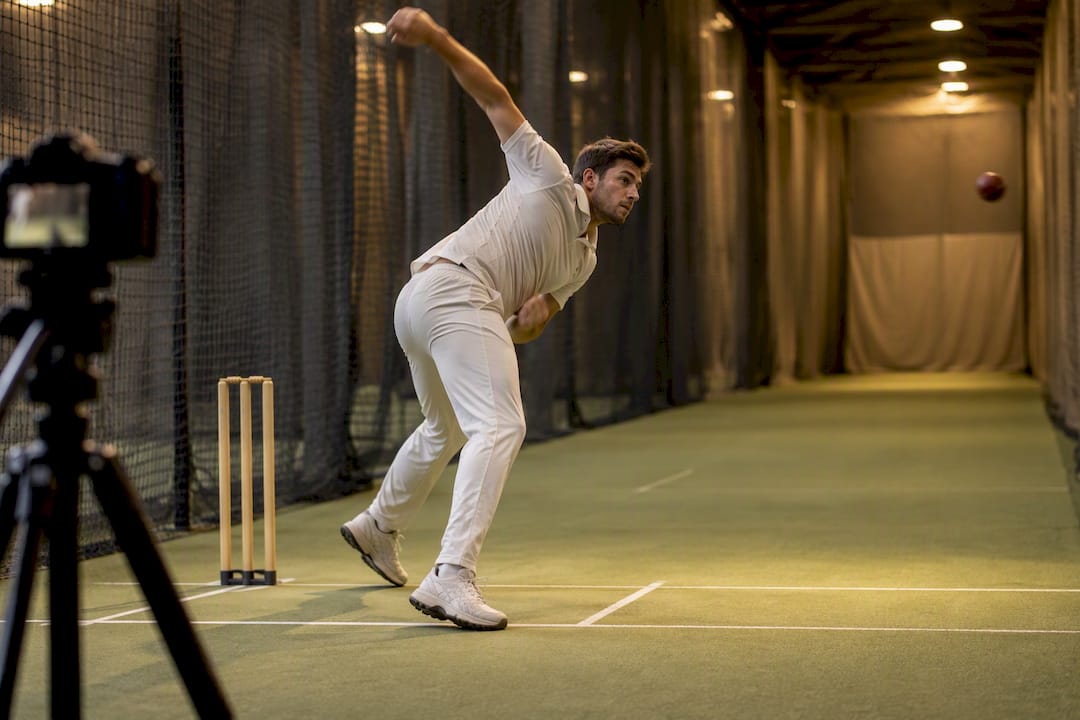
On settings, aim for 1080p as a minimum and 60 frames per second where possible for bowling, since faster actions need more frames to capture the elbow extension phase cleanly. Keep lighting even and avoid filming into direct sun or hall lights that flicker.
A repeatable workflow looks like this:
- Record the session from a fixed, calibrated angle.
- Auto-clip or manually trim to isolate each delivery or shot.
- Annotate the clip with the specific fault or pattern observed.
- Prescribe a drill targeted at that fault.
- Re-record under the same conditions to check the drill worked.
Pro Tip: Film a short calibration clip, a player standing still with arms out, at the start of every session so angle measurements stay comparable across weeks.
Key metrics coaches track from video
The KPIs worth tracking depend on the coaching question you are asking. Elbow angle, release point, ball speed, run-up speed, bat path, impact timing, and pitch maps each map to a different decision.
- Elbow extension angle: relevant to bowling legality and technique load.
- Release point consistency: an inconsistent release point often points to run-up rhythm problems rather than arm mechanics.
- Bat path and impact timing: an early front foot movement usually calls for a timing drill, not a technical rebuild.
- Pitch map or beehive: shows where deliveries actually land relative to where a bowler intends them to land.
The ICC applies a 15° elbow-extension tolerance when assessing whether a bowling action is legal, and that threshold is only confirmed through accredited 3D motion capture testing, not phone footage. Treat any phone-based elbow angle as a trend indicator worth flagging, never as a legal verdict.
Accuracy limits and when to trust the numbers
Markerless tools are convenient but not lab-grade, and the research is specific about where they fall short. A validation study of OpenCap for bowling analysis found average errors of roughly 17 to 23 degrees for some upper-limb joint angles compared with laboratory motion capture, which is a wide enough margin to make elbow angle a coaching trend rather than a certified measurement.
Common sources of that error include:
- Occlusion: an arm or hand passing behind the body confuses pose estimation.
- Low frame rate: fast actions blur across too few frames to track accurately.
- Poor synchronization: multi-camera setups that are not time-aligned distort angle calculations.
- Inconsistent camera position: moving the camera between sessions breaks comparability.
A two-camera markerless setup can still estimate elbow-extension angles well enough for early-warning use, according to research on a low-cost markerless motion-capture technique, which positions these tools as accessible screening aids rather than replacements for lab testing. The practical rule: use phone and markerless tools to track trends across a season, and refer any suspected illegal action or selection-level biomechanical question to accredited 3D lab testing.
How Kings Cricket Academy applies HD video analysis
At Kings Cricket Academy, HD video analysis is built into normal lane sessions rather than treated as a separate service. A bowler working on a lane is filmed alongside radar speed gun readings, and the coach reviews release point, run-up rhythm, and speed trends with the player before setting the next drill.
The workflow in practice looks like this:
- Capture: HD footage recorded during lane time, paired with radar speed data.
- Review: a coach walks through the clip with the player, flagging specific frames.
- Remediation: a targeted drill is set for the next session based on what the footage showed.
- Re-test: the same angle and setup are used next time to check the change held.
Coaches track outcomes such as release consistency, run-up speed, and whether a prescribed drill was actually completed before the next review. Sessions can be booked through private coaching, where fast bowling and batting work both use this same video-and-radar approach.
Where data ends, and coaching judgement begins
Video gives you numbers. It does not tell you which number matters for this player today. A release point that looks inconsistent on screen might just reflect a windy net session or a tired arm, not a technical fault.
The decision that actually helps a player combines the footage, what you see live, and what you know about their history. One habit worth building: never rewrite a technique plan off a single session’s data. Wait for a pattern across two or three sessions before you call it a trend.
— Abhimanyu
Book a session backed by real video analysis.
Reading about elbow angles and release points is useful. Having a coach point them out on your own footage, in the same session, is what actually changes your action. Kings Cricket Academy runs HD video analysis alongside radar speed monitoring on every lane, so the drill you leave with is based on what your footage showed, not a guess.

Sessions cover fast bowling, batting, and junior coaching, all run across six indoor lanes that stay open regardless of weather. Casual lane hire runs from $39 to $60 AUD per hour, and regular trainers can pick up the 6-visit plan at $300 AUD or the 10-visit plan at $450 AUD for repeat sessions. Book a lane or private coaching slot through the Kings Cricket Academy landing page to schedule your first HD analysis session.
FAQ
What is the best cricket video analysis app?
There is no single best app: the right choice depends on whether you need simple clipping and timing, which most phone apps handle well, or joint angle trends, which need a markerless pose estimation tool. Club coaches generally get the most value starting with a basic clipping app before adding an AI layer.
What is an example of video analysis in cricket?
A common example is filming a bowler side-on during a net session, clipping each delivery, and comparing elbow angle and release point across the session to spot inconsistency. That same clip can then be reviewed against a prior session to check whether a drill has changed the pattern.
Which AI is best for cricket analysis?
Research on 3D pose-based frameworks shows the strongest current results come from combining 3D pose estimation with AI shot classification, reporting accuracy up to around 97.7% for shot type detection under controlled conditions. These approaches need clean capture conditions to perform reliably, so results in a busy net session will typically be less precise.
What is the best app for sports video analysis?
The best option depends on the sport and the metric you need, since general sports video apps vary widely in whether they support pose estimation or just clipping and slow motion. For cricket-specific needs like elbow angle or bat path, a tool built around markerless pose estimation will generally outperform a generic sports clipping app.
Do I need a coach to interpret video analysis data?
Yes, because raw metrics like release point or elbow angle only become useful when someone with coaching context decides what they mean for that player. At Kings Cricket Academy, we always review HD video analysis with a coach rather than handing the player a standalone report.